
3528 vs 5050 LED Strips: Brightness and Power
3528 vs 5050 LED strips: chip size, brightness, power, density and channel fit compared. Pick the right SMD strip for your project.
On This Page
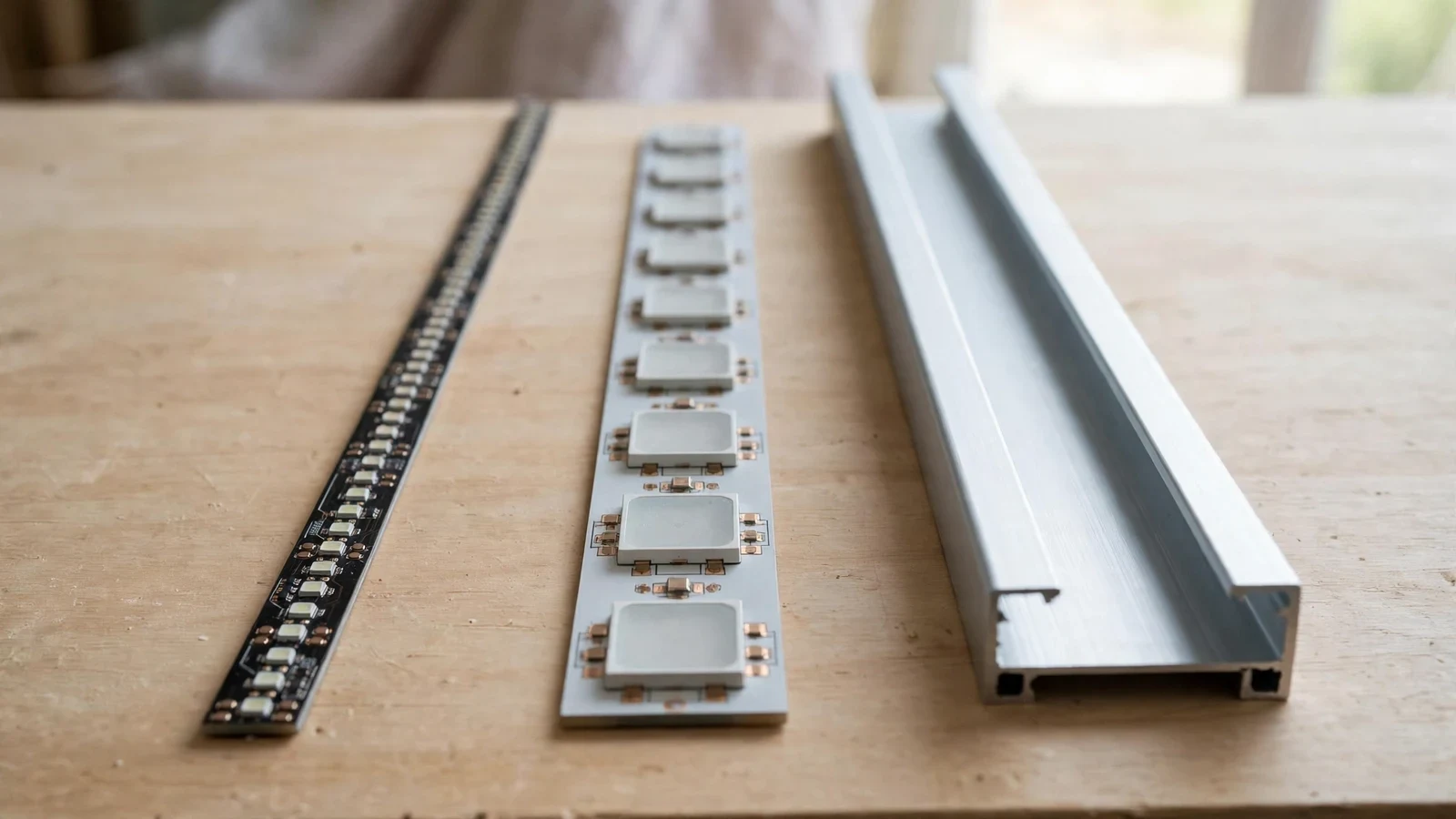
3528 and 5050 are SMD chip size codes, not strip brands. 3528 is 3.5 mm by 2.8 mm, and 5050 is 5.0 mm by 5.0 mm. Chip size sets the ceiling for single-chip brightness, power draw, and density. The rest of this guide compares the two models on brightness, power, density, heat, and channel fit. That comparison lets you match the strip to the job before you order.
What the numbers 3528 and 5050 mean
The four digits name the chip package, not the strip brand. The first two digits give the length in tenths of a millimetre, and the last two give the width. A 3528 chip is therefore 3.5 mm long and 2.8 mm wide. A 5050 chip is 5.0 mm long and 5.0 mm wide. The code tells you the size of one chip, and size sets what one chip can do.
Inside the package, the two models differ. A 3528 package holds one LED chip, so it gives one colour per chip. A 5050 package holds three chips in one housing, so it can mix red, green, and blue for colour change. That difference explains why 5050 is the base for RGB strips, while 3528 stays a single-colour strip. Chip packages come in more types than these two, and our comparison of COB, CSP, and SMD packages explains the wider family.
A third code, 2835, also appears in strip listings. It is a newer single-chip package, and it sits outside this comparison. This guide compares only 3528 and 5050, so 2835 numbers do not appear in the tables below. If a supplier quotes 2835, treat it as a separate option and ask for its own datasheet.
3528 vs 5050 at a glance
The table below puts the two models side by side at the same density. Figures are ranges from supplier listings, and exact values vary by product. Always confirm the numbers on the strip datasheet before you order. The table gives a fair starting point, not a purchase specification.
| Feature | 3528 | 5050 |
|---|---|---|
| Chip size | 3.5 mm by 2.8 mm | 5.0 mm by 5.0 mm |
| Chips per package | 1 | 3 |
| Single-chip power | 0.06–0.08 W | 0.2–0.24 W |
| Single-chip brightness | 6–8 lumens | 20–22 lumens |
| Common density | 60–240 LEDs per metre | 30–60 LEDs per metre |
| RGB colour change | No, single colour | Yes, three chips mix colour |
| Power at 60 LEDs per metre | 4.8 W per metre | 14.4 W per metre |
| Light at 60 LEDs per metre | 330–360 lumens per metre | 900–1,000 lumens per metre |
Two rows deserve a second look. The per-chip rows show why 5050 looks brighter in a single-point test, while the per-metre rows show what changes when density enters the picture. A 3528 strip at high density can close much of the gap, and the next section explains how. No row in this table is a promise, since each supplier builds to a different datasheet.
Brightness: per chip is not per metre
A 5050 chip is brighter than a 3528 chip. One 5050 chip gives about 20–22 lumens, while one 3528 chip gives about 6–8 lumens, per supplier listings. That gap comes from three chips in one 5050 housing against one chip in a 3528 housing. On a per-chip basis, 5050 is roughly three times as bright in theory, but that figure is not a measured result for a finished strip.
Per metre, the picture changes. Light per metre depends on chip brightness, LED density, and watts per metre together. A 3528 strip at 120 LEDs per metre can outshine a 5050 strip at 30 LEDs per metre, although each 5050 chip is brighter. That is why model name alone cannot tell you how bright a strip will look. Ask for lumens per metre on the datasheet, and compare strips at the same density.
Power, heat, and the channel
Power follows the same pattern. One 3528 chip draws about 0.06–0.08 W, while one 5050 chip draws about 0.2–0.24 W, per supplier listings. At 60 LEDs per metre, the totals are about 4.8 W per metre for 3528 and about 14.4 W per metre for 5050. The 5050 strip therefore needs a larger driver and moves more heat into the channel. Size the driver from watts per metre on the datasheet, never from the model name alone.
Heat is the reason the channel matters, and a 5050 strip at full power runs hotter than a 3528 strip at the same length. Heat shortens LED life when it has nowhere to go. An aluminum channel pulls heat from the strip, spreads it across the metal, and keeps the strip cooler. The wider the strip and the higher the watts per metre, the more the channel matters. A 5050 strip in a narrow plastic holder is a poor match.
Driver sizing follows a simple rule. Add up the watts for the full run, then pick a driver that covers that total with headroom. A driver that is too small will overheat, flicker, or shut down under load. A driver that is far too large wastes money and space, so match the driver to the run, not to the shelf. NIUYUAN does not supply drivers, so ask your driver supplier for the sizing sheet.
Carry watts per metre into the order
Watts per metre already folds chip power and density into one figure. It tells you what the driver must feed and what the channel must cool. Two strips with the same model name can carry different watts per metre, because suppliers build to different densities. That is why the datasheet figure matters more than the model code. Write the watts per metre next to the run length, and the driver total follows from those two numbers.
Density and the look of the light
Density is the number of LEDs on one metre of strip. A 3528 strip is often sold at 60, 120, or 240 LEDs per metre, because the small chip leaves room for more. A 5050 strip is often sold at 30 or 60 LEDs per metre, because the larger chip takes more space. High density gives a smoother line of light with fewer bright spots. Low density can show dots through a clear diffuser, even when the strip is bright.
Density also changes how a strip looks in a channel. A high-density 3528 strip can look like one smooth line behind a frosted diffuser. A low-density 5050 strip can still show dots unless the diffuser sits far enough from the chips. If a seamless line matters for your project, ask about density first and diffuser depth second. COB strips take a different path to the same goal, and our COB buying guide lists the checks that matter before you order.
A quick check on site settles the question. Hold the strip behind the diffuser you plan to use, and look at the line from the normal viewing distance. If you can pick out single points, raise the density or deepen the diffuser. This check costs minutes, while a wrong order costs a full reorder. It also catches a second problem: a strip that looks smooth in a sample may show dots once it runs the full length.
Which strip fits your project
Start from the job, not the model name. The table below matches three common jobs to the strip that usually fits. Treat each row as a starting point, then confirm density, watts per metre, and channel width on the datasheet. A strip that fits the job on paper still needs the right channel to look good in place.
| Job | Usual pick | Why it fits | Check first |
|---|---|---|---|
| Soft accent light, shelves and coves | 3528 | Low power, smooth line at high density | Density and diffuser depth |
| Bright task light, kitchens and worktops | 5050 | More light per chip, strong output per metre | Watts per metre and heat |
| Colour change, RGB scenes | 5050 | Three chips mix red, green, and blue | Driver type and control |
Two jobs can share one room. A kitchen can use 5050 under cabinets for task light and 3528 inside shelves for soft accent light. Mixing models is fine when each run has its own driver sizing and its own channel. Keep the two runs apart in the plan, and label each one with its model, density, and watts per metre.
Before you order: a short checklist
A good order starts with five questions, and the answers all sit on the strip datasheet. Ask the chip model first, then watts per metre, lumens per metre, and LED density. Ask the PCB width next, since the strip must fit the channel inner width with room to spare. A strip that is wider than the channel cannot be fitted, and a strip that fits too tightly traps heat.
- Chip model: 3528 or 5050, confirmed on the datasheet
- Watts per metre and lumens per metre, at the density you will buy
- LED density: LEDs per metre, and cut length between cut marks
- PCB width against the channel inner width, with room to spare
- Driver sized from total watts, with headroom for the full run
- Diffuser type and depth, checked against density for dots
Channel size deserves its own check. Measure the channel inner width before you order the strip, and leave a small margin for the strip to sit flat. Our strip dimensions guide covers PCB width, reel length, and cut lengths in one place. A datasheet also lists the numbers that matter for the profile, and our guide to reading a profile datasheet shows where each one sits.
NIUYUAN supplies the aluminum profile, not the LED strip. The profiles use 6063-T5 aluminum alloy and come from six in-house extrusion lines. The minimum order is 1,000 pieces, and lead time runs 20–30 days from prepayment. Standard samples are free, with freight collect, and arrive in about seven days. Custom profiles take 25–30 days, while stock sizes ship in 3–7 days.
Frequently asked questions
Is a 5050 LED strip brighter than a 3528 strip?
Per chip, yes. One 5050 chip gives about 20–22 lumens, while one 3528 chip gives about 6–8 lumens. Per metre, the answer depends on density and watts per metre, so check lumens per metre on the strip datasheet.
Can I fit a 5050 strip in the same channel as a 3528 strip?
Only if the PCB width matches the channel inner width. A 5050 strip often uses a wider PCB, so measure the channel first and check the strip dimensions guide before you order.
Which strip is better for RGB colour change?
The 5050 strip. Its package holds three chips, so it can mix red, green, and blue in one point of light. A 3528 strip holds one chip and gives one colour only.
Does a 5050 strip use more power than a 3528 strip?
Yes, per chip and per metre at the same density. Size the driver from watts per metre on the datasheet, and leave headroom for the full run.
Which strip should I choose for under-cabinet lighting?
Choose 3528 for soft accent light and 5050 for bright task light. In both cases, confirm density, watts per metre, and channel inner width before you order.

Share this guide
Tell us what you need
Send Your Project Requirements
Share your contact details and tell us which LED profiles you need.
Explore custom profile options